PlayStation 5
Platform-specific layer for PS5. Provides save-data I/O through IFileSystem, Trophies and a Activities API on top of the Sony PS5 SDK.
Setup
Install the following packages through Package Manager:
- com.unity.commondialog.ps5
- com.unity.inputsystem.ps5
- com.unity.playgo.ps5
- com.unity.psn.ps5
- com.unity.render-pipelines.ps5
- com.unity.savedata.ps5
- com.unity.share.ps5
Info
You can find all required packages on the Unity Discussions forum. A Unity Pro license is required.
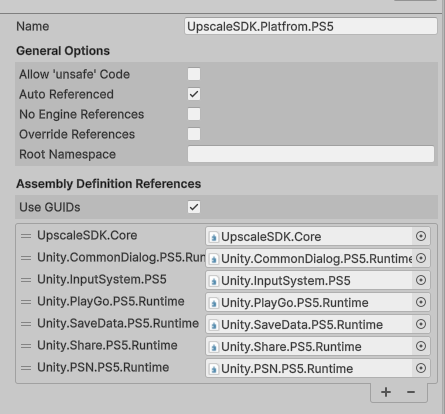
Check that all UpscaleSDK.Platfrom.PS5 assembly references are configured correctly.
Trophies
Ps5Trophies is the PS5 player-award API
Unlocking
Activities
Ps5Activities reports start / finish state for the PS5 Activities system.
Start / finish
Ps5Activities.StartActivity("activity_main_story_chapter_1");
Ps5Activities.FinishActivity("activity_main_story_chapter_1", ActivityResult.Completed);
ActivityResult
| Value | Meaning |
|---|---|
Completed |
Player finished the activity successfully |
Failed |
Player failed an objective |
Abandoned |
Player quit before completing |
Saves
Game code talks to the cross-platform UPSSaves.Prefs / UPSSaves.Saver APIs (see Manual → Saves). The PS5-specific bits are the storage allocation size (SavesSettings.SaveSize in MB) and the underlying PS5FileSystem implementation, which routes calls through Sony's save-data service.
Error handling
Save-data error handling on PS5 is automatic. When a save or load fails with no space or broken data, PS5FileSystem opens the matching Sony system message dialog (NoSpaceContinuable, Corrupted) and forwards a human-readable message through ErrorHandler.RaiseError(...). You don't need to author your own canvas or wire up per-error UI - the platform layer handles both the OS dialog and the error event.
Info
If you need to intercept the errors from game code, subscribe to ErrorHandler.OnError (see Manual → Saves → Error handling).